

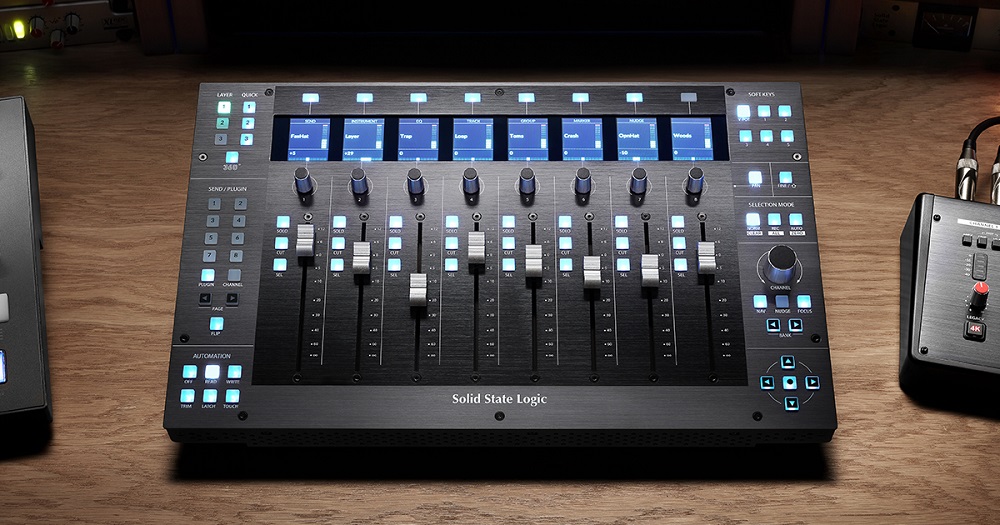
Producers who want a more immersive experience usually choose a control surface to guide their projects.
It offers direct manipulation of volume, panning, and effects without constant screen interaction. Behringer X TOUCH and PreSonus FaderPort 16 stand out with responsive touch sensitive faders.
These features allow precise control and easy track navigation. Other options like the Solid State Logic UF1 and Icon Pro Audio P1-M bring professional quality to home studios. Choosing the right device depends on your needs and budget. This guide will help you find the best control surface to enhance your DAW experience.
1. Behringer X-touch Universal Control Surface

The Behringer X-TOUCH Universal Control Surface is ideal for professional audio engineers, music producers, and home studio enthusiasts who require precise control over their digital audio workstations. If you need a versatile, tactile interface to enhance your mixing experience, this control surface offers an excellent solution with its motorized faders and multiple connectivity options.
Pros:
- Features 9 touch-sensitive motor faders for precise mixing control
- Includes LCD scribble strips for customizable track labeling
- Supports Ethernet, USB, and MIDI interfaces for versatile connectivity
- Compact and sturdy design with manageable dimensions and weight
- Compatible with a wide range of DAWs, increasing workflow flexibility
Cons:
- Learning curve for beginners due to advanced features
- Some users may find the size limiting for larger mixing setups
- Requires proper setup for optimal Ethernet functionality
The Behringer X-TOUCH stands out with its 9 touch-sensitive motor faders that provide smooth, accurate control over your mix. These motorized faders automatically adjust to your DAW’s settings, enabling hands-on mixing without losing visual feedback. The inclusion of LCD scribble strips allows users to label tracks clearly, enhancing session organization and reducing errors during complex projects.
Connectivity is another strong suit of the X-TOUCH, offering Ethernet, USB, and MIDI interfaces to ensure compatibility with various hardware and software setups. This flexibility allows users to integrate the control surface seamlessly into their existing studio environment. Additionally, its durable build and compact form factor make it suitable for both stationary studios and mobile setups, delivering professional-grade performance wherever you work.
To buy this product, click here.
2. Presonus Faderport 16

The PreSonus FaderPort 16 DAW Controller with Studio One Pro Software is ideal for music producers, audio engineers, and home studio enthusiasts who seek precise control over their digital audio workstation. If you want to enhance your mixing workflow with hands-on tactile control while integrating seamlessly with Studio One Pro Software, this controller is designed specifically for you.
Pros:
- High-quality motorized faders for precise control over 16 channels
- Compact and sturdy design with manageable dimensions (Height: 2.11 inches, Width: 19.6 inches, Length: 11.9 inches)
- Includes Studio One Pro Software, providing a complete production environment
- Improves workflow efficiency by allowing hands-on mixing and editing
- Compatible with various DAWs beyond Studio One for versatile use
Cons:
- Relatively heavy at 8.0 pounds, which might affect portability
- Learning curve for new users unfamiliar with DAW controllers
- Limited number of control knobs compared to some larger controllers
The PreSonus FaderPort 16 features 16 motorized faders that provide smooth, accurate control over your mix, enabling precise adjustments without relying solely on a mouse. Its compact footprint fits neatly into most studio setups, while the solid construction ensures durability during intense production sessions. The inclusion of Studio One Pro Software offers users a powerful, integrated platform to compose, record, mix, and master music, streamlining the entire production process.
This controller enhances the user experience by delivering tactile feedback and reducing the time spent on menu navigation and mouse clicks. Whether you’re automating volume changes or tweaking effects, the FaderPort 16’s intuitive layout supports a natural workflow. Although it weighs 8.0 pounds, the build quality and precise control it offers make it a valuable addition for anyone serious about digital audio production.
To buy this product, click here.
3. Solid State Logic Uf1

The Solid State Logic UF1 Advanced DAW Controller is ideal for professional music producers, sound engineers, and studio musicians who demand precise control and seamless integration with their digital audio workstations. If you are looking to enhance your workflow with a compact, high-quality controller that offers tactile control over your music production, this device is a perfect fit.
Pros:
- Compact and lightweight design at just 1.0 pounds, making it highly portable.
- Advanced control features tailored for professional DAW environments.
- High-quality build from the renowned Solid State Logic brand ensuring durability.
- Seamless integration with multiple DAW software for efficient workflow.
Cons:
- May have a steep learning curve for beginners unfamiliar with advanced DAW controllers.
- Limited physical dimensions might restrict some extensive control options.
The Solid State Logic UF1 Advanced DAW Controller offers a sleek and ergonomic design that fits comfortably into any studio setup without occupying much space. Its lightweight construction makes it easy to transport, allowing users to maintain consistent control whether working in the studio or on the go. The advanced features provide precise tactile feedback, which enhances the creative process by allowing producers to manipulate their DAW parameters effortlessly.
With its robust build quality, the UF1 ensures reliability and longevity, making it a worthwhile investment for professionals. The controller’s compatibility with a wide range of DAW software means users can enjoy smooth integration, reducing setup time and maximizing productivity. Overall, the Solid State Logic UF1 is a powerful tool that combines portability with professional-grade functionality for an enhanced music production experience.
To buy this product, click here.
4. Behringer X-touch One

The Behringer X-TOUCH ONE Universal Control Surface is ideal for musicians, audio engineers, and producers who seek a compact yet powerful device to enhance their digital audio workstation (DAW) workflow. If you want precise control over your mixing sessions with a touch-sensitive motorized fader and an intuitive LCD scribble strip, this control surface is designed to meet your needs. It’s especially suitable for those working in home studios or smaller professional setups who require reliable hands-on control without the bulk.
Pros:
- Touch-sensitive motorized fader for precise and smooth control of audio levels.
- LCD scribble strip allows customizable labeling for easy track identification.
- Compact dimensions (7.72″ width, 9.17″ length) and lightweight design (4.47 pounds) for portability.
- Universal compatibility with most major DAWs enhances workflow flexibility.
- Robust build quality from Behringer and Music Tribe US.
Cons:
- Limited number of faders (single channel), which might require frequent switching for larger sessions.
- Smaller control surface compared to full-sized consoles, potentially less intuitive for users accustomed to more extensive layouts.
- Some users may find the learning curve steep when first integrating with complex DAW setups.
The Behringer X-TOUCH ONE features a highly responsive motorized fader that provides smooth, tactile control over your mix, allowing for dynamic adjustments with precision. The inclusion of the LCD scribble strip is a standout feature, enabling users to label tracks or parameters clearly, which enhances session navigation and reduces confusion during complex projects. This small but powerful device fits comfortably on any desktop due to its compact size and lightweight design, making it easy to transport between studios or live environments.
Compatibility is another key advantage of the X-TOUCH ONE, as it integrates seamlessly with a broad range of digital audio workstations, giving users freedom to tailor their setup without being locked into specific software. The sturdy construction from Behringer and Music Tribe US ensures durability, promising a long-lasting addition to your audio toolkit. While it may not replace larger control surfaces for extensive mixing sessions, it excels as an efficient and practical solution for focused control and enhanced workflow in smaller or mobile setups.
To buy this product, click here.
5. Icon Pro Audio P1-m Daw Control Surface Bundle

The Icon Pro Audio P1-M DAW Control Surface Bundle with D4T Display is ideal for music producers, sound engineers, and home studio enthusiasts who want to enhance their workflow with a professional-grade control surface. This product is perfect for users seeking tactile control over their digital audio workstation (DAW) to streamline mixing, editing, and recording processes. Those who value precision, efficiency, and ergonomic design in their studio setup will greatly benefit from this bundle.
Pros:
- Compact and lightweight design making it easy to integrate into any studio space
- High-quality D4T Display providing clear visual feedback for better control
- Robust build quality from the trusted iCON Pro Audio brand
- Seamless integration with multiple DAWs for versatile use
- Ergonomic layout enhances productivity and reduces fatigue during long sessions
Cons:
- May require a learning curve for beginners unfamiliar with control surfaces
- Limited color options, only available in black
- Dimensions might be too large for extremely compact setups
The Icon Pro Audio P1-M DAW Control Surface Bundle features a sleek and modern design with precise control knobs, faders, and buttons that offer tactile feedback essential for professional audio production. Its integration with the D4T Display enhances the user experience by providing real-time visual information, which helps in making quick adjustments without switching screens. This results in a more intuitive and efficient mixing and editing process, allowing users to focus on creativity rather than technical hurdles.
Weighing only 4.4 pounds and measuring just over 20 inches in length, the control surface is highly portable, making it suitable for both stationary and mobile studio environments. The sturdy build ensures durability, while the ergonomic layout reduces strain during extended use. Overall, this bundle offers a perfect balance of functionality, quality, and user-friendly features, making it an excellent investment for those looking to elevate their music production workflow.
To buy this product, click here.
Frequently Asked Questions
What Control Surface Suits Beginners For Daws?
The Behringer X-TOUCH ONE is ideal for beginners. It offers one touch-sensitive motor fader and easy integration. Its LCD scribble strip helps label controls clearly. It supports Ethernet, USB, and MIDI interfaces for versatile connections.
Which Control Surface Has The Most Motor Faders?
Behringer X-TOUCH features 9 touch-sensitive motor faders. This allows precise control over multiple DAW channels simultaneously. It includes LCD scribble strips for track identification. This setup enhances mixing efficiency and workflow in professional environments.
Can Control Surfaces Improve Daw Workflow Significantly?
Yes, control surfaces streamline mixing and editing. They offer tactile control over faders, pans, and plugins. This reduces mouse usage and speeds up production. Devices like PreSonus FaderPort 16 include software integration for smooth operation.
What Makes Solid State Logic Uf1 Unique?
The Solid State Logic UF1 offers advanced DAW control with high build quality. It includes motorized faders, rotary encoders, and an OLED display. This controller integrates tightly with popular DAWs for professional studio performance.
Is Software Included With These Control Surfaces?
Yes, some units include software bundles. For example, PreSonus FaderPort 16 comes with Studio One Pro software. This helps users start producing immediately. Bundled software adds value and enhances user experience.
How Do Control Surfaces Connect To Daws?
Most control surfaces connect via USB, MIDI, or Ethernet. Behringer X-TOUCH supports all three for flexibility. Reliable connection ensures low latency and stable control. Choosing the right interface depends on your setup and DAW compatibility.
Conclusion
Choosing the right control surface can greatly improve your music production experience. Each device offers unique features to fit different needs and budgets. The Behringer X-TOUCH models provide versatile controls and strong connectivity options. PreSonus FaderPort 16 stands out with its many faders and included software.
Solid State Logic UF1 is perfect for those who want advanced control and professional build quality. Icon Pro Audio P1-M offers a great balance of display and control features. Consider what fits your workflow best. A good control surface makes mixing and editing easier and faster.
Think about your studio space, budget, and the software you use. This way, you can pick a control surface that helps you create music more smoothly and enjoyably.
